
Probably Stolen Aug guide: identify customers and deal with them
Identify Augs from customer clues, confirm with the scanner, and use the Mentor’s shotgun. Learn the consequences of calling Security, threats and mistakes.
Demo 050-Rev5-L +1
Version history
- Demo 050-Rev5-L Main guide
Added illustrated faction clothing comparisons and rechecked the identification flow in Demo 050.
- Demo 049-Rev5-L
Original identification, scanning and shotgun guide.
How do you identify and deal with Augs?
Observe first, scan if you are unsure, then use the Mentor’s shotgun once you have confirmed an Aug. Security arrives automatically after the shooting. Calling Security while the Aug is still alive lets it escape.
Augs are humans taken over by rogue AI implants. An exposed chip is only one possible sign. Glasses or a face without an obvious implant do not rule out an Aug.
This guide covers Demo 050-Rev5-L. Complete the Mentor’s Aug and shotgun tutorial to unlock the shop shotgun. If it is still locked, continue the story.
Which customer clues should you check?
Read the customer’s full sentence, then check their face and movements. The in-game Augmented Identification Guide lists visual and non-visual clues.

Official identification example: check the eyes, expression and exposed chip.
| Check | Possible clues |
|---|---|
| Eyes, expression and head | Unusual pupils, a strange expression, an exposed Aug chip |
| Movement | Unnatural stiffness, twitching |
| Clothing | Clothes that do not match the customer’s faction |
| Dialogue | Mechanical wording, overly formal language |
You do not need to see a chip to suspect an Aug. If a greeting sounds stiff, look for other signs or confirm with the scanner. A single polite phrase is not a reason to shoot.
Recognize faction clothing and spot a mismatch
Use the customer’s displayed identity as the starting point, then compare the portrait with the examples below. Look at the whole outfit: cut, headwear, equipment and repeated colors. These are examples of common appearances, rather than one compulsory uniform for everyone in a faction.
- Read the customer’s name, role and faction information before judging their clothing.
- Compare their outfit with the relevant group below. A Lower Level Citizen in upper-level finery is a reason to inspect more closely.
- Check the eyes, expression and dialogue as well. If the identity and appearance disagree, scan the customer before drawing the shotgun.
Upper Levels


Formal shirts, waistcoats or elaborate dresses and jewelry. These examples look dressed for comfort or status rather than manual work.
Lower Levels


Practical work shirts, overalls, caps or goggles. Scavengers also belong to the Lower Levels, so this faction has more than one clothing style.
Black Market
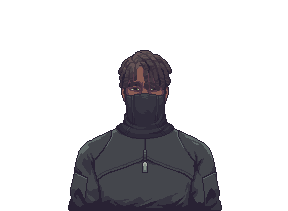
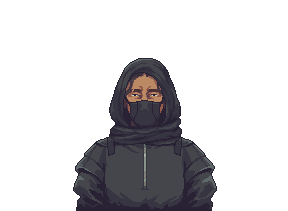
Security
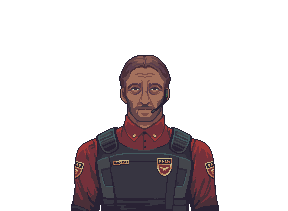
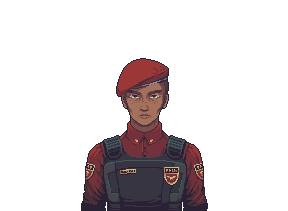
Red uniform sleeves or beret, dark protective vest and visible insignia. Compare the uniform and equipment together.
Revolution
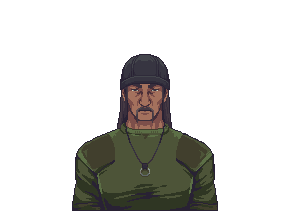
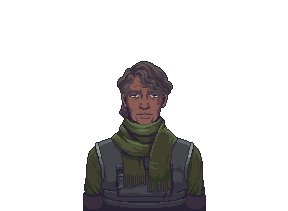
Green combat clothing, tactical vest, knit cap or scarf. Compare these green outfits with Security’s red uniform examples.
Clothing that matches also does not clear a customer: disguised Augs can use ordinary faction portraits. Use clothing to notice a contradiction, then combine it with the other clues or a scanner result. Faction membership, an occupational outfit and an Aug identity are different checks.
How do you confirm a customer with the scanner?


Scan the customer at your counter
Insert a cell with at least 25 energy remaining, wait for the customer at the counter, then activate the scanner. Read its tooltip while that customer is still present.
The Aug detected result confirms the current customer is an Aug. No Aug detected means they are not. Ready to scan means you have not scanned them yet. The scanner has no random false readings, and each customer can be scanned once.
For buying the scanner, fitting its cell and fixing activation problems, see Magnifying Glass and Aug Scanner.
What should you do after confirming an Aug?

The Mentor’s shop shotgun
Use this dedicated shop interaction after the tutorial. Complete the identity check before equipping it.
- Check that the same customer is still at the counter and you have completed the Mentor’s shotgun tutorial.
- Press and hold the shop’s shotgun to enter shooting mode.
- Confirm the target, then press the left mouse button to fire. The right mouse button exits shooting mode and dismisses the customer. Finish your identity check before drawing the shotgun.
- Finish the conversation with Security when they arrive automatically after the shooting. Do not call an officer in advance.
Correctly dealing with an Aug gives credits and Security reputation, and reduces Aug presence. A plea for mercy after you draw the shotgun does not rule out an Aug. Use the identity check you made beforehand.
This uses the dedicated interaction unlocked by the Mentor’s tutorial. Ordinary inventory weapons have a separate gunsmithing workflow.
Why should you avoid calling Security first?
Augs monitor Security communications and leave before the officer arrives. Act while the Aug is still in your shop, then speak to the officer who arrives automatically after the shooting.
Can you threaten an Aug first?
Threatening the customer prevents you from equipping the shotgun for that encounter. If you intend to shoot a confirmed Aug, finish the identity check and draw the shotgun directly.
Threatening an ordinary customer costs reputation. If you are unsure of their identity, confirm it with the scanner.
What happens if you shoot the wrong customer?
Shooting an ordinary customer brings Security to the shop. It normally opens a manslaughter investigation and costs reputation. If the officer says “We will let it slide for this time,” a contact exemption has applied.
If an investigation has begun, read crime and hiding for evidence and investigation services.
What if you keep letting Augs go?
Letting a living Aug leave increases the threat. Correctly dealing with one reduces it. Continuing to ignore them can lead to the Assimilation ending.
Watch the status panel for visit warnings and read the Mentor’s messages. Check the customer currently at your counter before acting.
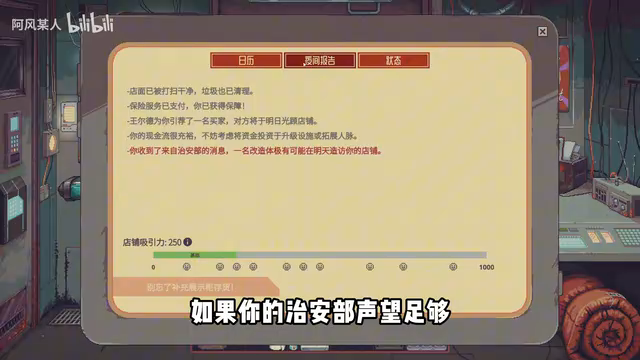
The status panel can display a warning about a possible Aug visit. Simplified Chinese interface; the video does not show its build.
Game footage: 阿风某人, 00:40, published 2026-10-11.
What else should you read?
-
Aug Scanner: buying, power, activation and results.
-
Energy cells and charging: prepare power for the next scan.
-
Crime and hiding: existing investigations and risky stock.
-
Beginner guide: separate item appraisal from checking customer identity.
-
Security guide: reputation, VIP and inspections: Prepare for visits, check VIP and display stock, and identify the fake inspector.
Related faction and character entries: People, Identities and Organizations
Related Articles
Wiki
Augs
Read about Augs, their identity, visits, goods and services, with links to related people, organizations and guides.
Wiki
Security Officer
Read about Security Officer, their identity, visits, goods and services, with links to related people, organizations and guides.
Wiki
Security Requisition Officer
Read about Security Requisition Officer, their identity, visits, goods and services, with links to related people, organizations and guides.
Was this helpful?
Thanks for the feedback!